
We will explain to you the purpose of 2D drawings in CAD design for engineers, manufacturers etc.
You will get to know about the applications and reasons behind their use in design projects.
Engineering and design demands clarity and accuracy. Now, people have moved from manual drawings to Computer-Aided Design. In CAD, the most essential feature is 2D drawing. Professionals in various industries require these drawings.
Let us discuss why we create 2D drawings in CAD. Moreover, we will understand the benefits, uses, and importance of the design process.
2D Drawings in CAD Design Explained
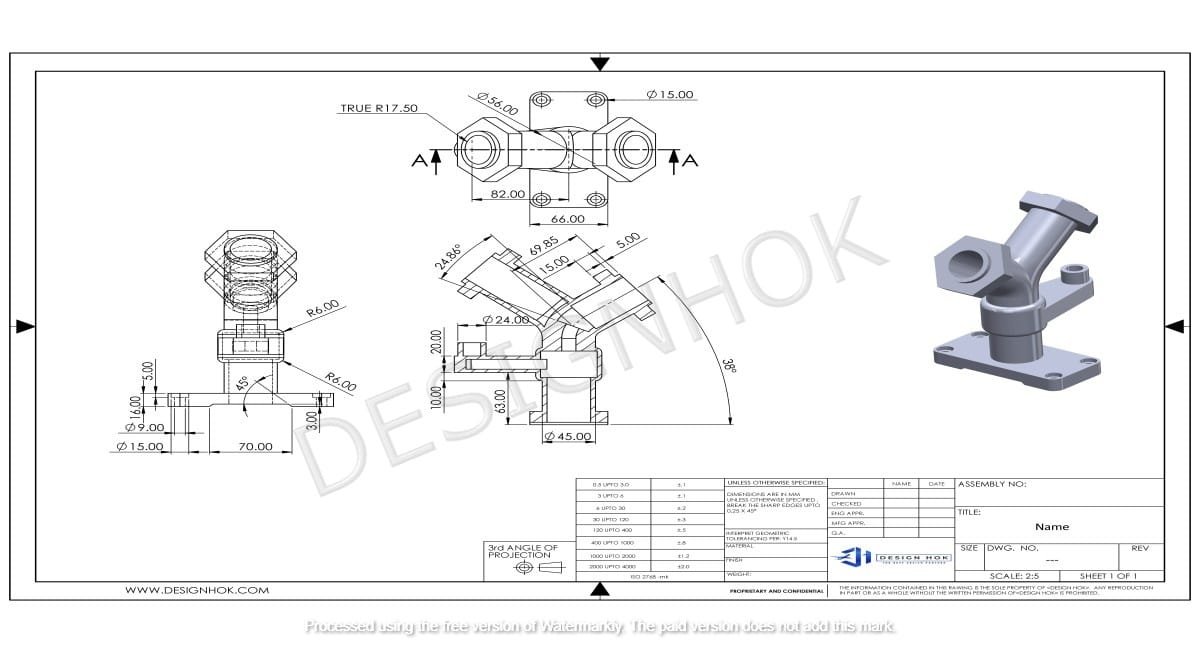
2D drawings in CAD design mean making flat pictures of objects. You get to know the shape, layout, and dimensions of a design. They are not like 3D models and do not represent the depth or volume.
You show various parts of a design using lines, circles, and text. The initial step in the design process is 2D drawings using CAD. 2D drawings may be simple sketches or in-depth technical blueprints for construction and manufacturing.
1. Clear Communication
You can explain ideas clearly using 2D drawings. This is the reason that such pictures or sketches allow designers to convey their ideas to designers, engineers, and manufacturers.
2. Accuracy and Precision
CAD allows designers to be very precise. Unlike hand-drawn sketches, CAD reduces human error.
Example: Even a tiny mistake in a machine part can cause fitting problems. So, CAD software makes sure that all parts fit perfectly by providing correct measurements.
3. Standardization
You have to follow standard rules when creating 2D CAD drawings. This means checking line thickness, dimensions, symbols, etc. This results in the drawings being understandable and readable across teams.
Example: Engineers anywhere can read a CAD drawing if it follows standard practices.
4. Easy to Edit
You can quickly update drawings using CAD software. You do not need to start from the beginning if you messed up.
For Instance, if you want to edit a building layout, then you can edit quickly in the CAD file. This makes you more productive and minimizes errors.
5. Quick Results and Boost Efficiency
You use CAD software for creating 2D drawings, which enhances productivity. So, you can use the elements again. Apart from that, you can also copy parts and add dimensions instantly.
For Instance, it allows updating numerous drawings on the same projects, which keeps everything consistent.
6. Manufacturing Details
2D drawings are used as blueprints in manufacturing. They show dimensions, materials, and assembly instructions.
For Instance, you show the exact size of drawings and their method of assembly with the help of a part drawing. This helps manufacturers make the product correctly.
7. Legal Documentation
In many industries, 2D drawings serve as legal documents. They define the work scope, materials, and procedure.
For Instance, these drawings are used for contracts in construction. You can avoid disagreements by clear drawings.
8. 3D Modeling Foundations
2D drawings are the core of 3D models. You get an idea of the measurements and details required for exact 3D objects.
For instance, you create 2D sketches and utilize them to create 3D models. This results in the creation of an accurate final model.
Uses of 2D Drawings in CAD Design
You use 2D drawings in many fields. These include:
- Engineering: You can create mechanical parts, electrical systems, and machinery
- Manufacturing: This includes part designs, assembly instructions etc.
- Construction: You can make project documentation, work scope, contract
Summary
You require 2D CAD drawings in modern design. These are clear, precise, and efficient.
This lets teams communicate and collaborate.
So, 2D drawings are essential for the final blueprint or the core of 3D modeling. These drawings make sure that professionals can understand designs and work on it correctly. This helps in innovation across various industries.
FAQs
Q1: Why do you need 2D CAD drawings in manufacturing?
You get precise dimensions and instructions with these drawings. So, it results in manufacturers creating parts correctly.
Q2: How do you differentiate between 2D CAD and 3D CAD?
You get to know the shape and size of dimensions in 2D CAD. But 3D CAD adds other dimensions like depth and volume.
Q3: Can 2D CAD drawings be used for design and construction?
You can convey exact project dimensions and other specifications using 2D CAD.
Q4: How do you boost accuracy using CAD tools?
You get accurate measurements and updates using CAD software. This also minimizes errors.
Q5: Name the industries that require 2D CAD drawings?
There are several industries that depend on 2D drawings for exact and efficient design. These include manufacturing, construction, automotive, and engineering.
Q6. Can you create the final product assembly using 2D CAD drawings?
Sure, detailed 2D CAD drawings give you information for the exact assembly of a number of products. This is important when you require precise measurements.